
Blog
Switching EHRs Without the Headache: A Step-by-Step Guide to Moving to Turncloud

Changing EHR systems can feel like moving offices.
You know the change may be good for your practice. But you still have to think about patient records, billing, appointments, staff training, and all the little details that keep your day running.
That is why many chiropractors stay with software they have already outgrown. They worry that switching from ChiroTouch, ChiroFusion, Jane App, or another application will be disruptive. They worry about losing data. They worry their staff will need weeks to learn a new system.
Those concerns are understandable.
The good news is that an EHR migration does not have to become a major interruption. With a clear plan and the right implementation support, you can move your practice to Turncloud in manageable steps.
At a Glance
How difficult is it to switch from another chiropractic EHR to Turncloud?
A well-planned migration is usually much simpler than practice owners expect. You organize the data that matters, work with Turncloud’s implementation team to map and verify it, train your staff through an intuitive interface, and move to a clear go-live date without losing access to your previous records. See how to switch chiropractic software without missing a billing cycle.
Step 1: Decide What Data Needs to Move
Before exporting anything, make a list of the information your practice needs to keep.
Most offices moving from ChiroTouch or another EHR focus on these six categories:
- Patient demographics: Names, dates of birth, addresses, phone numbers, email addresses, emergency contacts, and referral information.
- Visit history: Previous appointments, treatment history, diagnoses, and other important record details.
- SOAP notes: Clinical documentation that needs to remain available for ongoing care and reference.
- Billing and ledger information: Patient balances, payment history, charges, claims, adjustments, and accounts receivable.
- Insurance information: Carriers, member IDs, group numbers, subscriber details, authorizations, and benefit information.
- Upcoming schedule: Future appointments, appointment types, provider assignments, and reminders.
Not every old record needs to be converted into a perfectly structured, active chart.
For example, you may want active patients and current care plans fully available in Turncloud. Older inactive charts may be preserved as secure, read-only files. Your implementation team can help you decide what should be imported, what should be archived, and what should be reviewed manually.
If you are leaving ChiroTouch, its export process can vary depending on whether you use the server-based or cloud version. ChiroTouch provides printing and exporting guidance, as well as a patient file transfer option. Start early, especially if you need a complete extraction of notes or attachments.
Step 2: Clean Up Your Data Before Migration
Migration is a good opportunity to remove clutter.
That does not mean deleting important records. It means identifying duplicates, outdated contact information, inactive providers, old appointment types, and billing items that no longer apply.
A simple cleanup can make the new system easier to use from day one.
Create a short list of questions:
- Are there duplicate patient profiles?
- Which patients are currently active?
- Are phone numbers and email addresses current?
- Which future appointments must be moved?
- Which claims are still open?
- Are patient balances accurate?
- Which templates, forms, and note styles does the team actually use?
Keep your original export files in a secure, access-controlled location. Do not send full clinical records through ordinary email or leave files on an unsecured desktop.
The goal is not to make your data perfect. The goal is to make it clear enough to map, verify, and use.
Step 3: Let Turncloud’s Implementation Team Handle the Heavy Lifting
You should not have to figure out every migration detail alone.
Turncloud’s implementation team helps you organize your information, identify the data sources, and determine how records should appear in the new system. That includes reviewing patient fields, provider information, insurance details, appointment data, notes, and billing workflows.
A typical implementation conversation covers:
- What system you are leaving.
- Whether it is cloud-based or server-based.
- What data you want fully migrated.
- What should be archived instead.
- How open claims and patient balances should be handled.
- What your office needs on the first day.
The team can also help you test a sample before the full migration. A sample review gives your doctor, front desk staff, and biller a chance to confirm that the information looks right.
Check a few different types of records:
- A new patient profile.
- A long-term patient with a detailed history.
- A patient with insurance information.
- A patient with an outstanding balance.
- A patient with upcoming appointments.
- A chart containing previous notes or attachments.
This step is important because it catches mapping issues before they affect the entire database.
Step 4: Take Advantage of Faster Implementation
Turncloud is built around the key workflows of a chiropractic office.
That matters during migration. You are not moving into a generic system that requires your team to build every process from scratch. Turncloud brings patient intake, data entry, scheduling, notes, billing, insurance, and reporting together in one cloud-based application.
Because the workflows are focused, practices can often get up and running in days rather than facing a long, drawn-out implementation.
The exact timeline depends on the size of your practice, the quality of your source data, the information you want to migrate, and the export process required by your current vendor. Still, the streamlined design helps shorten the path from “we are switching” to “we are using it every day.”

Step 5: Train Staff Without Weeks of Manuals
One of the biggest hidden costs of changing EHRs is training time.
A complicated system can create weeks of questions, workarounds, and frustration. Even experienced staff may struggle if familiar tasks are buried under too many menus.
Turncloud follows a no-manual philosophy. The interface is designed to be clear and intuitive, so staff can find the next step without memorizing a complicated process.
Your team should still practice the workflows they use most:
- Creating and updating a patient.
- Reviewing demographics and insurance.
- Scheduling and rescheduling an appointment.
- Sending reminders and two-way texts.
- Starting and completing a note.
- Posting payments and reviewing balances.
- Submitting or managing billing tasks.
- Running basic practice reports.
Train by role rather than showing everyone every feature at once.
The front desk can focus on intake, scheduling, and communication. Providers can focus on notes and patient history. Billing staff can focus on claims, ledgers, and payments.

Step 6: Go Live With the Workflows That Matter
On your go-live date, the goal is simple: run the day in Turncloud.
That means:
- New patients are entered in Turncloud.
- Appointments are scheduled in Turncloud.
- Staff check the new schedule in Turncloud.
- Providers complete notes in Turncloud.
- Charges, payments, claims, and balances are handled in Turncloud.
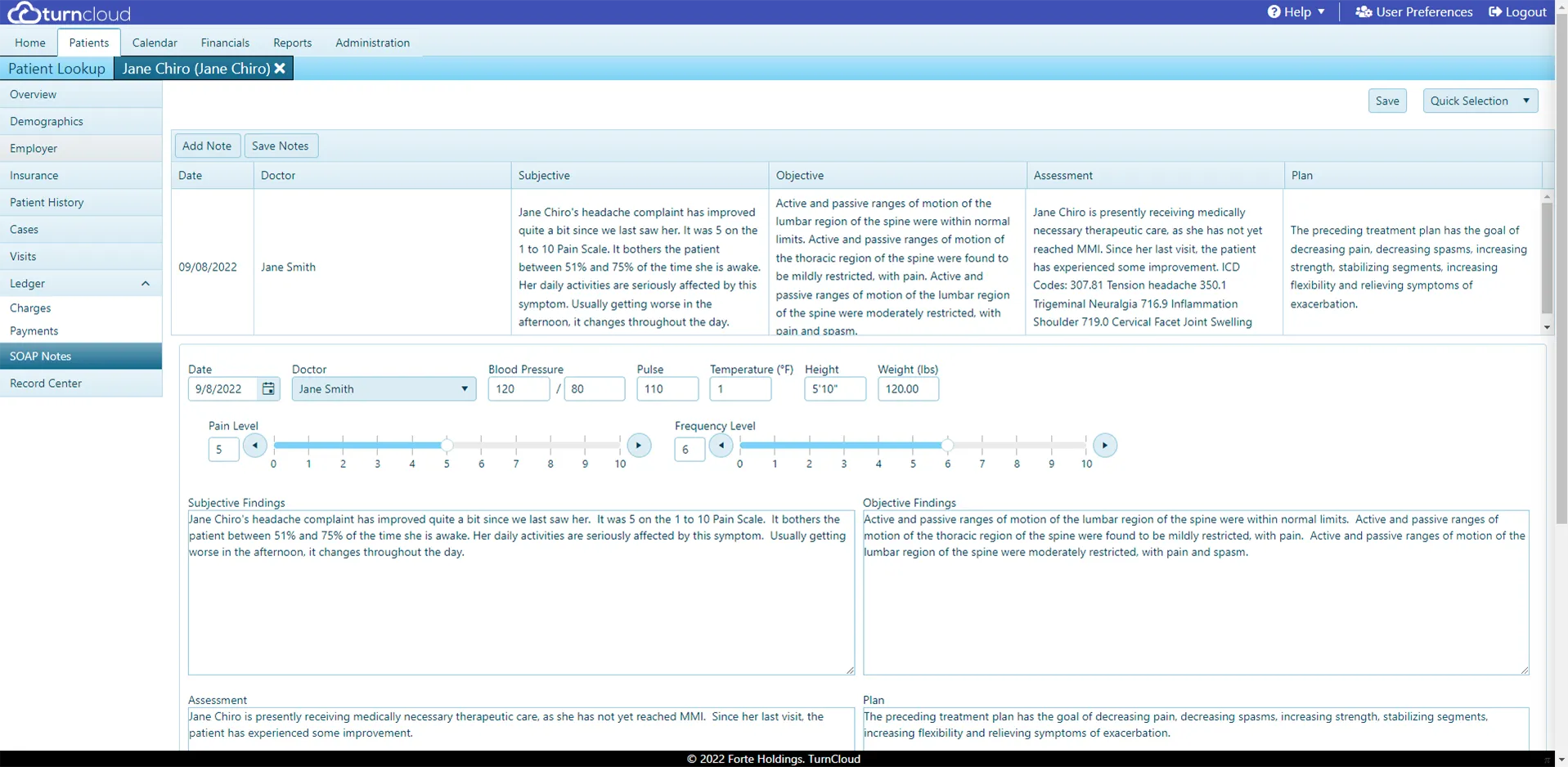
Turncloud’s scheduling tools help your team manage appointments and reminders. Its billing tools connect financial workflows with the rest of the practice. And Chiroglyphix™ AI SOAP notes will help reduce charting time, while keeping the provider in control of reviewing and approving every note.
Step 7: Use a Short Parallel Run
A brief parallel run can make the transition feel safer.
For a few days, keep your previous EHR available for reference. Use Turncloud as the primary system, but check the old application when you need to confirm a historical note, balance, or appointment detail.
Avoid creating duplicate new records in both systems for an extended period. That creates confusion and increases the chance of mismatched information.
A practical approach is:
- Before go-live: Complete the data review and move future appointments.
- First few days: Use Turncloud for all new activity and keep the old system available for reference.
- First one to two weeks: Monitor notes, claims, balances, and scheduling closely.
- After the team is comfortable: Fully cut over and retain the old data according to your practice’s record-retention needs.
Your full cutover date should be clear to everyone. Once that date arrives, new charges, appointments, and clinical notes should be created in one system only.
Step 8: Keep Support Close After Migration
The first week is when questions naturally come up.
A staff member may wonder where to find a balance. A provider may want to adjust a note workflow. A biller may need help reviewing a claim. These are normal questions, not signs that the migration failed.
Turncloud provides friendly, live-person, U.S.-based technical support. You are not left to search through a knowledge base while patients are waiting. Help is available as your team builds confidence with the new workflow.
Turncloud also backs up your data automatically, with offline storage options available. That gives your practice an additional layer of protection and reduces the risk of relying on manual backup routines.
What to Expect: Migration Checklist
Use this checklist when planning your move from ChiroTouch or another EHR:
- Choose a target go-live date.
- List the data you need to migrate.
- Identify active patients, open claims, balances, and future appointments.
- Request the appropriate export from your current vendor.
- Secure your original export files.
- Review a sample migration with Turncloud.
- Confirm patient, note, insurance, scheduling, and billing accuracy.
- Train staff by role.
- Test a few complete patient workflows.
- Use Turncloud for all new activity after go-live.
- Keep the old system available briefly for reference.
- Contact live support whenever questions come up.
- Confirm that backups and your long-term archive plan are in place.
The Payoff of Making the Switch
Switching EHRs is a project, but it does not have to be a crisis.
With Turncloud, you get a cloud-based system built for chiropractic workflows, so your practice can work from anywhere with an internet connection. You get an intuitive design that does not require weeks of training. You get automatic backups, scheduling, billing, reporting, and documentation in one place.
You also get straightforward value: flat $99 or $149 a month plus a one-time $499 setup fee, with unlimited providers in the same office, and AI charting with Chiroglyphix™.
That means fewer surprise costs, less time spent learning software, and more time available for patients.
If you are considering moving from ChiroTouch or another application, learn more about Turncloud’s features or schedule a friendly conversation with our team.